Operation Panel
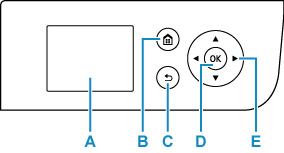
- A: LCD (Liquid Crystal Display)
- Displays messages, menu items, and the operational status.
- B: HOME button
-
Used to display the HOME screen.
- C: Back button
- Returns the LCD to the previous screen.
- D: OK button
- Finalizes the selection of a menu or setting item. This button is also used to resolve an error.
- E:
 ,
,  ,
,  , and
, and  buttons
 -
Used to select a menu or setting item.
